Wellbore cross section
The Wellbore Cross Section tab shows a cross-sectional view of the wellbore, looking down the well at the depth specified on the Depth Based CMW form.
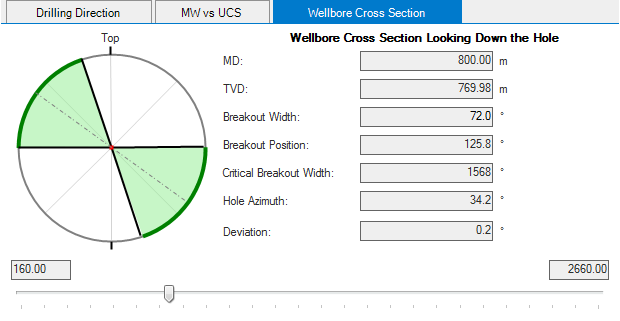
The Wellbore Cross Section tab click to enlarge
Depth, breakout, and orientation information is displayed to the right of the cross-section view.
Red breakout
The colored portions of the wellbore cross section indicate the failed, or broken out, parts of the wellbore wall. If the breakout width exceeds the limit given in the input data and shown on the plot to the left, the breakouts are colored red.
Green breakout
If the breakout width falls below the specified limit, the breakouts are colored green.
Example
The figure below shows the same wellbore at two different depths, with the breakouts falling within a safe range in the first cross-section view (green), and the breakouts exceeding the limit in the second cross-section view (red).
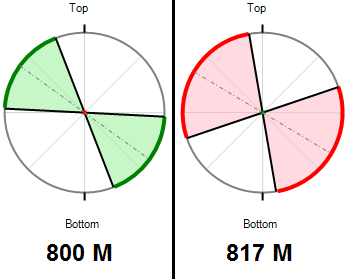
Breakouts within (left) and outside limits click to enlarge
You can change the depth for the view by specifying a different value in the Depth input box of the Depth Based CMW form, or by dragging the slider below the cross-section view to a different position.
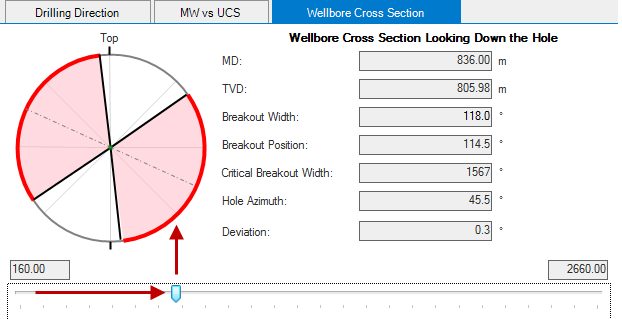
Drag the slider below the cross-section view click to enlarge
You also can change the axis text from the "Top"-"Bottom" (which is a default mode) to the "North"-"South", using the context menu of the cross-section plot. Note that this will not update the reference coordinates but will only change the axis text in the plot.